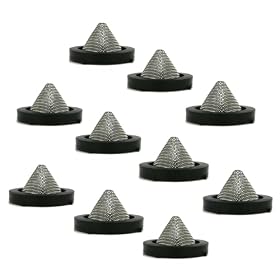
A clogged or damaged inlet screen can restrict water flow and leave debris heading toward the pressure washer pump. Here’s what to check and how to care for it.
Why the inlet screen matters {#why-the-inlet-screen-matters}
The inlet filter screen keeps grit and other debris from entering your pressure washer’s pump. Check it whenever you connect the water supply, especially if you use a well, rain barrel, or older garden hose. A clogged screen can restrict flow; a torn or missing one may let debris reach the pump.
The screen is usually at the pressure washer’s garden-hose water inlet, sometimes inside a removable fitting or a separate inlet filter. Some machines also use an inline filter. Check your owner’s manual to identify the correct parts and whether your washer requires a particular filter.
Product prices and availability are accurate as of the date/time indicated and are subject to change. Any price and availability information displayed on Amazon.com at the time of purchase will apply to the purchase of this product.
How to inspect and clean it {#inspect-and-clean-the-screen}
Turn the pressure washer off, disconnect it from power, shut off the water, and release pressure as directed in the manual.
Disconnect the garden hose and look into the water inlet. Remove the screen only if the manual says it is removable.
Rinse loose sand and debris from the screen with clean water. If needed, use a soft brush; don’t force a sharp tool through the mesh or stretch it.
Check for tears, a bent frame, corrosion, or a screen that will not seat securely. Replace damaged or missing parts with one compatible with your washer.
Reinstall the screen in the correct orientation, reconnect the water, and follow the manual’s priming or startup steps.
Do not run the washer without a required inlet screen, and don’t assume a screen from another machine will fit. A poorly fitting filter can leak or fail to protect the pump.
Product prices and availability are accurate as of the date/time indicated and are subject to change. Any price and availability information displayed on Amazon.com at the time of purchase will apply to the purchase of this product.
If water flow or pressure is still poor {#check-flow-after-inspection}
A dirty inlet screen is only one possible cause. With the machine off, check that the water supply is turned on, the garden hose is not kinked, and the connections are secure. Make sure the supply can provide the flow required by the pressure washer; use the manual for its specific requirements. If your setup has an inline inlet filter, inspect that too.
After restoring water flow, follow the manufacturer’s instructions for purging air from the hose and pump before starting the motor. If the washer still pulses or has weak output, consult the manual’s troubleshooting steps. Stop using it if you hear unusual pump noise, see a leak, or suspect the pump is running without adequate water. Persistent problems may need a compatible replacement filter or service from a qualified repair provider.
FAQ
Where is the inlet filter screen on a pressure washer?
It is usually at the garden-hose water inlet on the pressure washer, either inside the fitting or in a removable inlet filter. Some setups also use a separate inline filter. Check the owner’s manual for your model’s location and removal instructions.
Can I run a pressure washer without its inlet screen?
Don’t run it without a screen if the manufacturer specifies one. The screen helps keep debris out of the pump, and operating without it can increase the risk of damage.
How often should I clean the inlet screen?
Inspect it when connecting the water supply and clean it whenever you see debris or flow restriction. Check it more often when drawing water from a source that may contain sediment, while following the manual’s maintenance schedule.
Can I use any replacement inlet screen?
No. The screen and fitting need to match your pressure washer and seat securely. Check the manual or parts information for a compatible replacement.